

The short version#
Most firewalls think in terms of ports and addresses. LordOS's firewall thinks in terms of apps: you decide which of your apps may use the network, and how much of it. And because it is built into the Monitor, you can see what each app is doing before you decide.
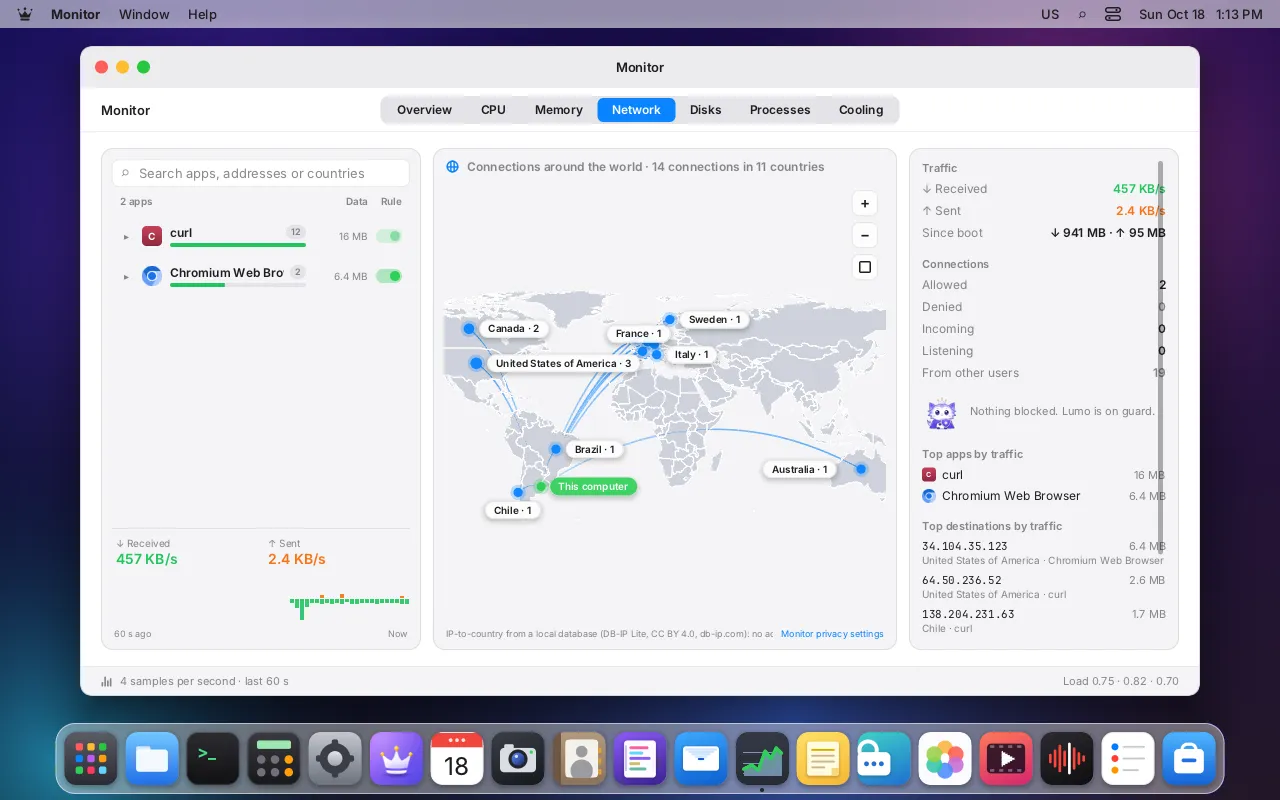
Picture a building with a guard at every apartment door instead of one at the street. When an app tries to open a connection, the guard at its door checks its list in a fraction of a microsecond and either lets it through or answers "not permitted". The guard sits inside the Linux kernel, so a determined app can't simply walk around it.
The path of a connection or a device
- YouApp opens a connection or a deviceconnect, sendto, bind, socket, or open() of a device nodethen system call
- KerneleBPF programs in the kernelcgroup network hooks; cgroup/dev for camera, USB, ALSA capture and /dev/fb; BPF LSM socket_create for Bluetooth. The app is found by its scopethen map lookup
- OursPer-app rulesRestrictions first, then the most specific rule, then trusted, then modethen decision
- BlockedAllow or denyDenied: the app gets EPERMthen ring buffer
- OursMonitor mapNew connections, denials and counters, once per second
Legend: YouKernelOursBlocked
What you see and decide#
- Monitor → Network lists the apps with connections, how much each one sent and received, and a world map with an arc to each country they talk to. Each app has a Rule switch: turn it off and the app is denied the network at once, with allowed and denied counters coming straight from the kernel.
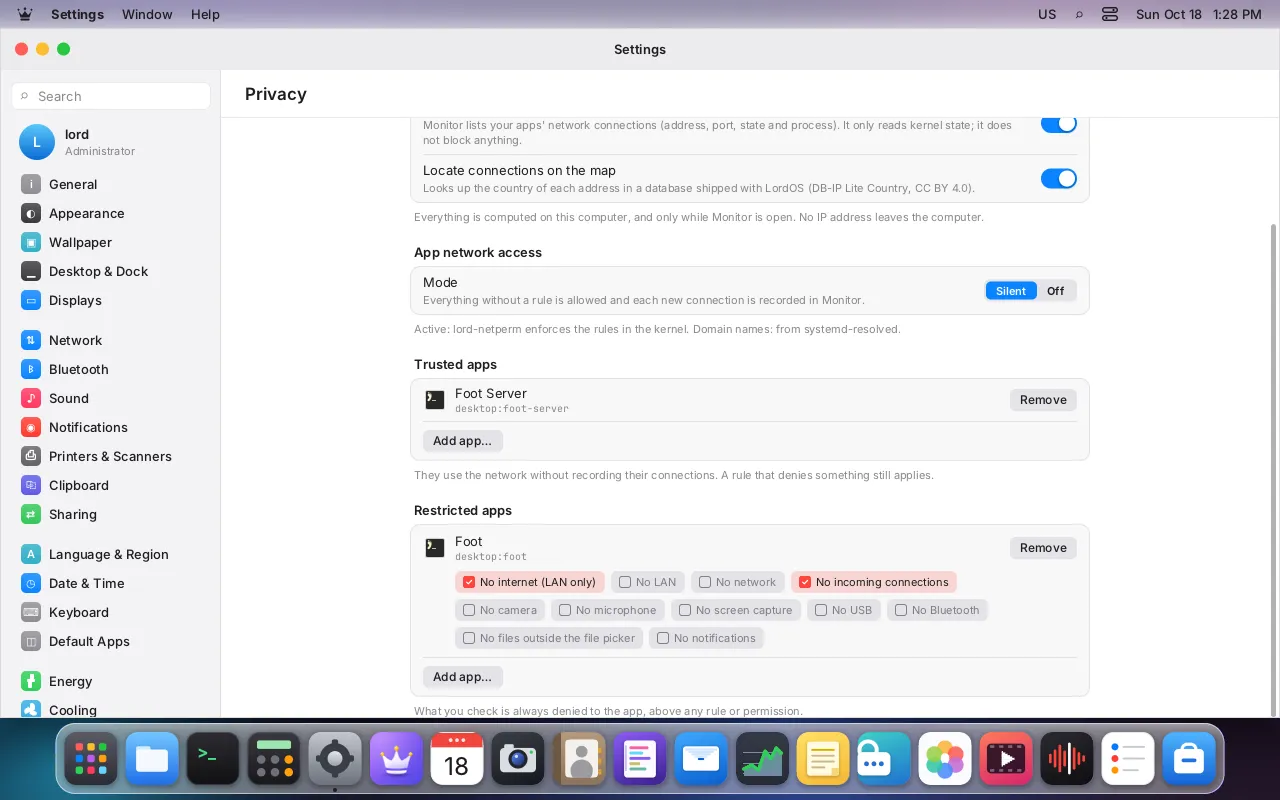
- Settings → Privacy → App network access has a mode and two lists:
- Silent (the default): whatever has no rule is allowed and recorded, so you can review it in the Monitor. Off: only your explicit denials and restrictions apply.
- Trusted apps: allowed without recording. An explicit denial you set still wins.
- Restricted apps: tick what an app may not do. The network restrictions are no internet (LAN only), no LAN, no network at all and no incoming connections. The others take away devices and data (see Beyond the network).
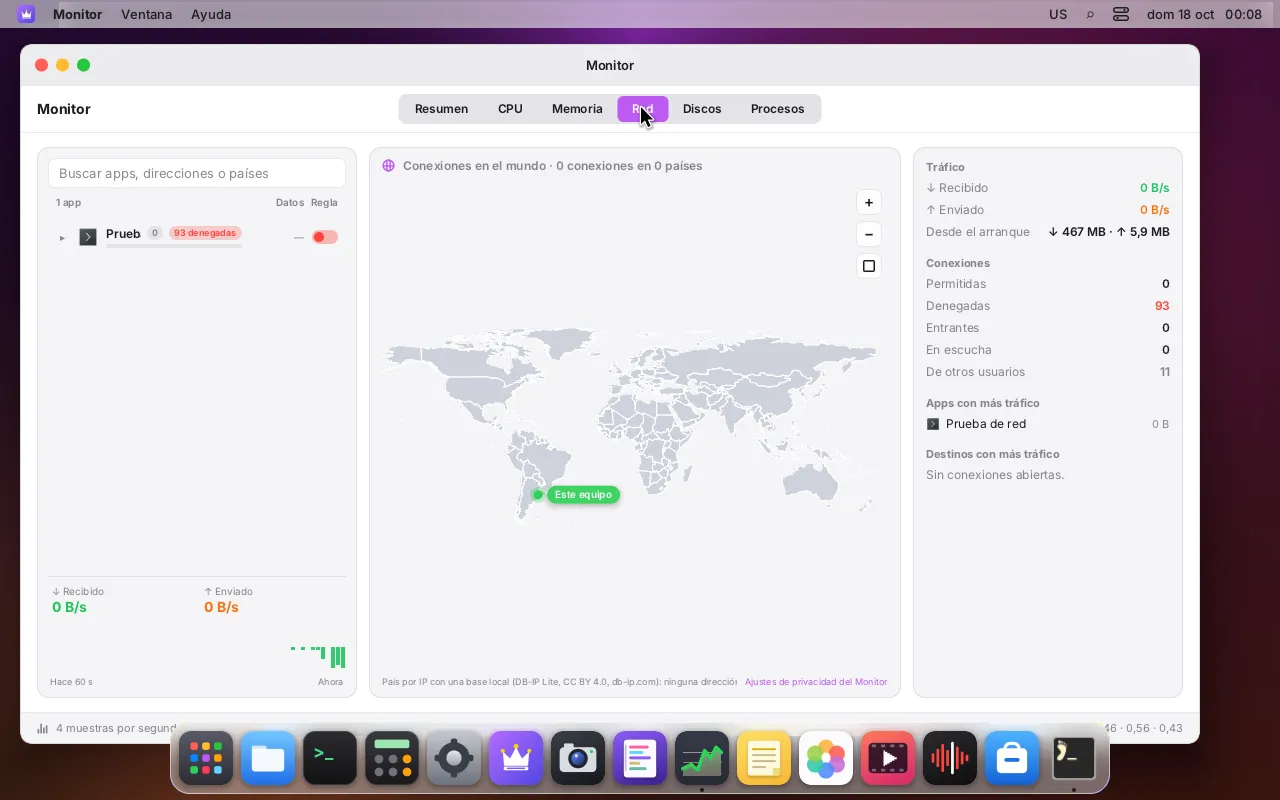
How it works#
1. Every app has a name the kernel can see. When you open a Linux app from the app launcher, lord-server asks root to place it in its own cgroup, app-lordos-<id>.scope. Installed .lpk apps get app-lordos-lpk-<id>.scope. These scopes are created and owned by root, so an app can't move itself to another one.
2. A small root service enforces the rules. lord-netperm loads its eBPF programs into the cgroup of the LordOS service, which contains every session:
| Kernel hook | What it checks |
|---|---|
connect4, connect6 | TCP and connected UDP |
sendmsg4, sendmsg6 | UDP sent with an address |
bind4, bind6 | incoming: "no incoming connections" and inbound rules |
sock_create | "no network": the app can't even create an internet socket |
cgroup/dev | a Linux app's camera, USB, ALSA capture and framebuffer devices, on open() |
LSM socket_create | a Linux app's Bluetooth sockets |
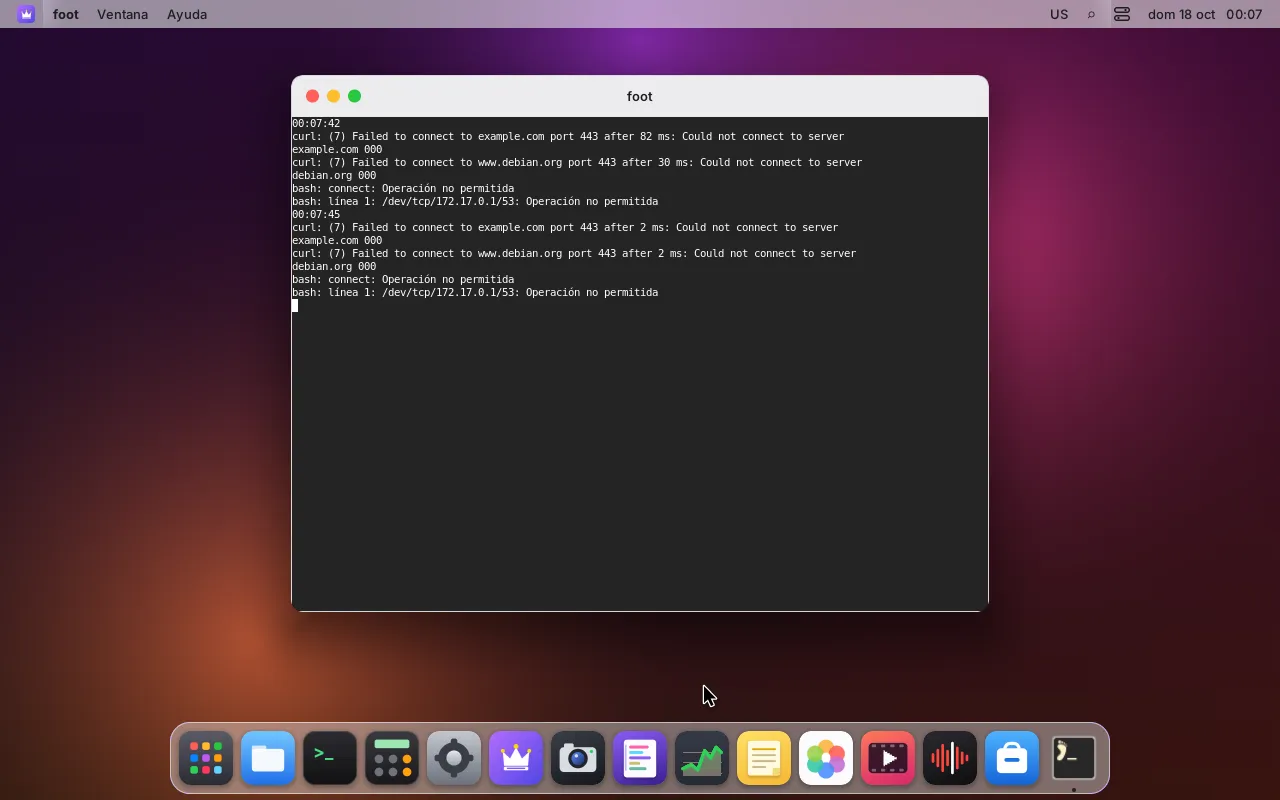
Each program finds which app the calling process belongs to (by the cgroup ancestor at the scope level, so child processes count as the same app), decides, and returns allow or deny. A denied app gets EPERM, "Operation not permitted".
3. Your rules become kernel maps. You change rules in the session; lord-server saves them to ~/.config/lordos/firewall.json and sends lord-netperm a single message with no data: RELOAD. The service then reads the file itself, strictly validated, and compiles the rules into hash and longest-prefix-match maps. The rules never travel over the socket.
4. Nothing runs per packet. The checks run when a connection is opened or a port is bound, not for every packet. Measured on a test VM: about 0.5 µs per UDP connect, TCP within noise, and no change in throughput (docs/FIREWALL.md).
Does it work per domain?#
The engine does, with care about where names come from. A connection only carries an IP address, so to apply a rule like "allow only example.com", the firewall must know which names an address belongs to. It learns that only from the system resolver: it subscribes to systemd-resolved's monitor (or, without it, reads replies from port 53 of the servers in /etc/resolv.conf). It never trusts DNS answers an app received on its own sockets, which a malicious app could forge.
Where domain names come from
- ReusedSystem resolversystemd-resolved, or replies from port 53 of the configured serversthen answers
- OursStrict DNS readerOnly the chain that follows from the questionthen name → IP
- KernelAddress entriesOne kernel map node per learned address
- BlockedApp's own DNSNever learned: such addresses don't match an allow rule
Legend: ReusedOursKernelBlocked
On the test VM, "deny everything except example.com" let https://example.com through and denied https://www.debian.org, 20 out of 20 times even with an empty resolver cache. An app that uses its own DNS-over-HTTPS gets addresses the firewall never learned, so under such a rule they are denied.
Where you write them. Settings → Privacy → Network rules by app shows each app's default ("Allow all" or "Block all except rules") and its rules in the order they win, since the most specific one wins, with when each one last matched. The sheet that adds a rule takes an exact domain, *.domain, an address or a network, with an optional port and protocol, and checks what you type as you type it. In Monitor → Network, "Allow this domain" or "Block this domain" on one of an app's destinations opens the same sheet, prefilled with the name the system resolver gave for that address.
The honest catch: encrypted DNS. A browser that resolves names itself over DNS over HTTPS never asks the system resolver, so its names aren't learned. "Allow only example.com" still holds (the addresses it gets were never learned, so they are blocked), but "Block example.com" doesn't stop it. Address and network rules, the app's default and its restrictions still apply, and Settings says so under the rules.
Beyond the network#
The same Restricted apps list can also take away the camera, the microphone, the screen, USB, your files, the clipboard, Bluetooth and notifications. A restriction beats any permission you granted before: the app is refused without a prompt, and restricting a running app takes its camera and microphone away at once. Each one is enforced where the resource is handed out:
Where each restriction is enforced
- OursBroker in lord-server.lpk apps and Passwords: all eight restrictions, refused without a prompt
- OursApp launcherLinux apps, no access to your files: own user, mount and PID namespaces, a tmpfs home and Landlock, from the next launch
- OursNotification server (notifyd)Linux apps' notifications: the sender's identity comes from the bus; failures drop it
- OursPipeWire guard (pwguard)Microphone and camera through PipeWire: identity from the socket's credentials, applied live
- Kernellord-netperm's eBPF programs in the kernelNetwork hooks; cgroup/dev for camera, USB, ALSA capture and /dev/fb; BPF LSM socket_create for Bluetooth sockets
Legend: OursKernel
- LordOS's isolated apps (
.lpkapps and Passwords): all eight, in the broker that already mediates everything they get. - Built-in apps (the "LordOS" row): camera, microphone, screen and notifications. That row is the desktop itself, so files, USB, clipboard and Bluetooth are restricted per app instead.
- Linux apps opened from the app launcher: the camera, USB, ALSA capture and framebuffer devices are refused in the kernel (
cgroup/dev); Bluetooth sockets by a BPF LSM program; the microphone and PipeWire cameras by LordOS's PipeWire guard, live, with each client identified by its socket's credentials; notifications by LordOS's notification server, which asks the bus who is calling and drops the notification if it can't tell; and "no access to your files" starts the app, from its next launch, in its own namespaces with an empty home folder and Landlock. Screen capture was never available to them: there is no capture protocol and no X server.
The skeptical reader's questions#
Does it apply to Linux apps too? Yes. That is one of its main points: Chromium, Firefox or any app opened from the app launcher has its own scope and its own rules. Built-in LordOS apps and programs started from the Terminal count together as "LordOS".
Can an app escape its scope? It was tried. A Linux app can't write itself into another cgroup, because every cgroup.procs file in the session's tree belongs to root. It can still ask the user's systemd manager to start a new process outside the tree (systemd-run --user). LordOS closes that too: lord-netperm also attaches its programs to each user's user@<uid>.service, and any process there is held to the strictest union of the restrictions of that user's running restricted apps. Tested with systemd-run --user --scope, a transient service and setsid: all denied.
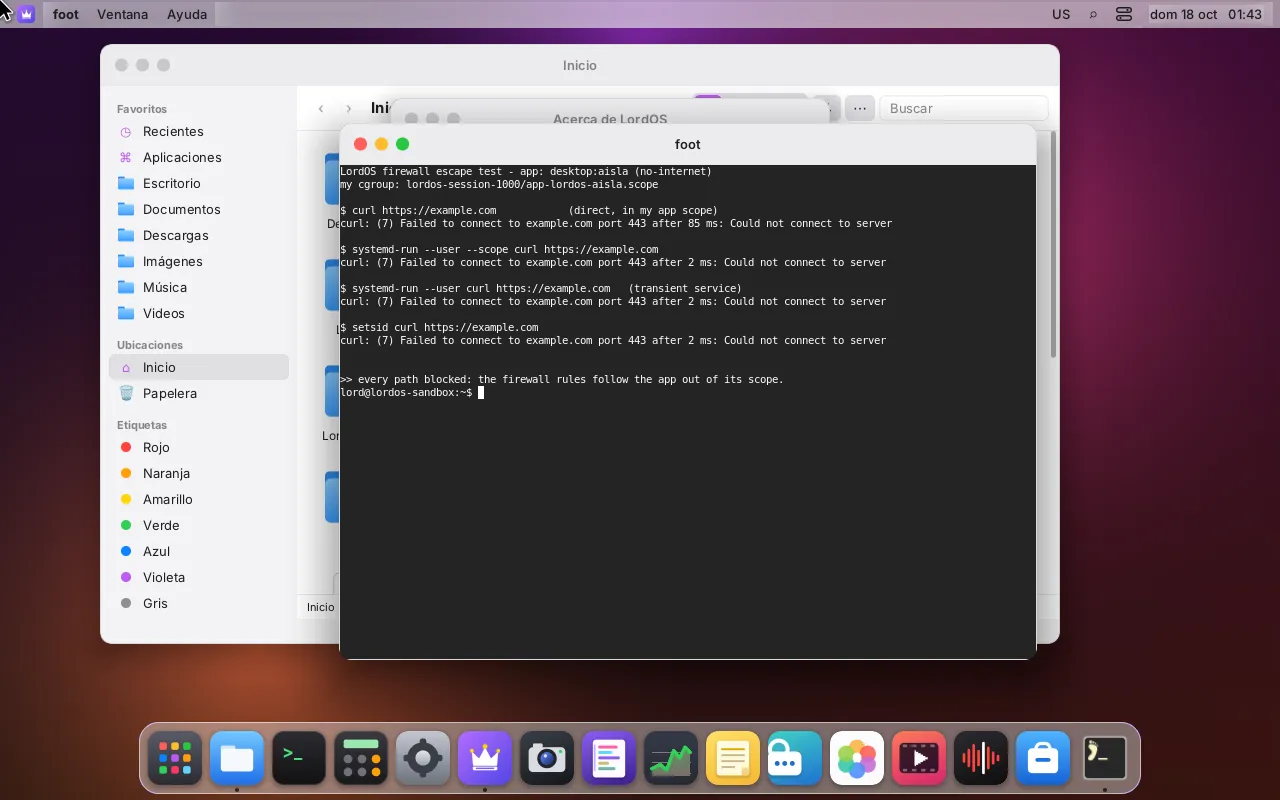
Can I allow a connection just once, or be asked? The rule engine knows three durations (forever, until the app quits, just once) and an "ask" mode, but the ask prompt isn't built yet: today "ask" behaves like silent. It is designed as a retry prompt: the first connection is denied, you get Allow once / Always / Deny, and the app's retry goes through.
What happens if the service stops? Its links are closed and everything is allowed. The desktop doesn't depend on it. On the final ISO the service was running with its seven network programs attached.
Is the service itself dangerous? It is kept small on purpose: it runs no programs, takes no arguments, has no internet sockets of its own (its unit only allows Unix and packet sockets), and accepts one message type. It uses its own loader over the bpf() system call, with the programs compiled into the binary; no libbpf or bcc.
Honest limits#
- ICMP (ping) is only blocked by "no network". Incoming connections to a port that is already open, and
listenwithoutbind, aren't checked: that would need a per-packet hook. - The
user@union is coarse: while a restricted app runs, every process in that user's systemd manager is held to the union of restrictions. - A brand-new scope is registered within microseconds, but a connection made before that would pass under default rules.
- The Monitor lists destinations as IPs and countries; the name the system resolver gave appears when you open "Allow / Block this domain". The Monitor never does reverse DNS, so no address leaves the machine just because you looked at it.
- Domain rules don't see apps that use their own encrypted DNS (see above).
- What the restrictions don't cover for Linux apps: Bluetooth through BlueZ on the system bus (only raw Bluetooth sockets are refused), the system bus in general, the clipboard, and programs started outside the app launcher. A new PipeWire client of a restricted app has a few milliseconds before the guard restricts it, and while a camera- or Bluetooth-restricted app runs, your own audio services can't open a new camera or Bluetooth socket either.
- The rules file can be edited by unsandboxed Linux apps, since they run as you, unless they are restricted with "no access to your files". Installed
.lpkapps can't reach it.